Best Business Laptops
March 2026
Every business laptop tested for what professionals actually need — security, keyboard quality, battery life, and the reliability to last a 5-year deployment cycle without excuses.
⚔️ Head to Head Battle
Apple MacBook Air 13″ (M5)
Best Business Laptop Overall
The MacBook Air M5 is the most recommended business laptop of 2026 across every major review outlet. The M5 chip delivers a 50% single-core lead over Intel Panther Lake in Cinebench, which translates to noticeably snappier Excel macros, web apps, and email workflows. The 18-hour real-world battery means back-to-back meetings without hunting for an outlet. At $1,099 with 16GB RAM, 512GB SSD, and Wi-Fi 7 standard, it undercuts most premium Windows business laptops while outperforming them. The fanless design means zero noise during video calls. The trade-off is macOS — if your company runs Windows-only enterprise software, this isn’t your machine. For everyone else, it’s the business laptop to beat.
✅ PROS
- 18-hour battery life — best in class for business
- M5 chip outperforms most $2,000 Windows laptops
- Completely silent — fanless design ideal for meetings
- Wi-Fi 7 + 512GB base storage standard in 2026
- Build quality and trackpad remain class-leading
- macOS security and ecosystem integration
✖ CONS
- macOS won’t run all Windows enterprise software
- No USB-A or HDMI — dongle life required
- 16GB RAM ceiling limits heavy multitasking
- No touchscreen option available
- Webcam is only 1080p — adequate but not great
- Limited to one external display without workarounds
Lenovo ThinkPad X1 Carbon Gen 13
Best Premium Windows Business Laptop
The ThinkPad X1 Carbon has been the gold standard for premium business laptops for over a decade, and the Gen 13 Aura Edition continues that legacy. At under 2.5 lbs with Intel Core Ultra 7 Lunar Lake, it delivers strong all-day performance with enterprise-grade security including Intel vPro, TPM 2.0, and fingerprint reader. The legendary ThinkPad keyboard remains the best in the business — deep travel, excellent spacing, and the iconic TrackPoint. The 14-inch FHD+ touchscreen is sharp, and ports include Thunderbolt 4, USB-A, and HDMI. For professionals who need the best typing experience, enterprise security, and ultralight portability on Windows, the X1 Carbon Gen 13 is the proven choice you can buy today.
✅ PROS
- Best keyboard in any business laptop — legendary ThinkPad feel
- Under 2.5 lbs with all-day battery life
- Intel vPro + TPM 2.0 for enterprise security
- Thunderbolt 4, USB-A, and HDMI ports
- MIL-STD-810H durability tested
- TrackPoint pointing stick for precision navigation
✖ CONS
- Premium price — starts around $1,799
- Display is FHD+ not OLED — adequate but not stunning
- Lunar Lake performance trails Panther Lake successors
- Speakers are below average for the price
- RAM is soldered — not upgradeable
- Fan audible under sustained heavy workloads
Apple MacBook Pro 14″ (M5 Pro)
Best for Power Users & Creatives
When the MacBook Air isn’t enough, the MacBook Pro 14 M5 Pro steps in with desktop-class performance. The 15-core CPU and 16-core GPU handle 4K video editing, large dataset analysis, and local AI model inference without breaking a sweat. The 14.2-inch Liquid Retina XDR display is the best screen on any business laptop — 1,600 nits peak HDR brightness with ProMotion 120Hz. Battery life still hits 16+ hours despite the added power. At $1,999 for 24GB/1TB, it’s a significant investment, but for professionals who need both performance and portability — financial modelers, developers, creative directors — nothing else delivers this combination.
✅ PROS
- Desktop-class M5 Pro performance in a portable form
- XDR display — 1,600 nits HDR, ProMotion 120Hz
- 16+ hour battery even under heavy workloads
- Handles 4K video editing and large datasets effortlessly
- HDMI, SD card reader, MagSafe, and Thunderbolt 4
- Best speakers on any laptop — six-speaker system
✖ CONS
- $1,999 starting price is a serious investment
- 3.4 lbs — heavier than ultraportable competitors
- macOS limits Windows enterprise software compatibility
- Overkill for standard Office and email workflows
- Notch in the display divides opinions
- No touchscreen option available
Lenovo ThinkPad T14s Gen 6
Best Keyboard & All-Day Workhorse
The ThinkPad T14s Gen 6 is Lenovo’s mid-range workhorse that punches above its weight class. Available with AMD, Intel, or Snapdragon processors, it lets you match the chip architecture to your workflow. The Snapdragon variant delivers nearly 24 hours of battery life in testing, while the AMD Ryzen AI 7 Pro variant offers the best balance of performance and efficiency. The ThinkPad keyboard is expectedly excellent, MIL-STD-810H durability keeps it road-ready, and the port selection — Thunderbolt 4, USB-A, HDMI — covers every conference room scenario without dongles. At 2.8 lbs, it disappears in a bag.
✅ PROS
- Excellent ThinkPad keyboard with deep key travel
- Three CPU options — Intel, AMD, or Snapdragon
- Snapdragon variant gets ~24 hours battery life
- MIL-STD-810H military durability testing
- Thunderbolt 4, USB-A, HDMI — no dongles needed
- 2.79 lbs — lighter than MacBook Air
✖ CONS
- Display brightness is only 400 nits — struggles outdoors
- No OLED display option on most configs
- RAM is soldered and non-upgradeable
- Intel variant has poor cooling
- Pricing varies wildly — check current deals
- Snapdragon variant may have app compatibility issues
ASUS ExpertBook P5 (P5405CSA)
Best Feature Value Under $1,200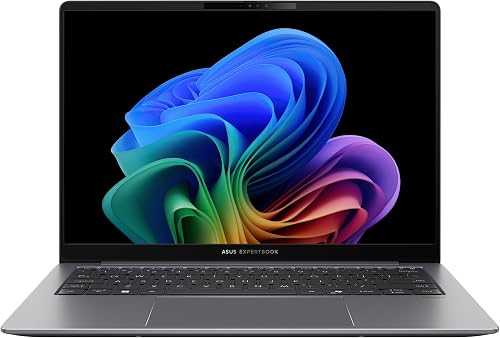
The ASUS ExpertBook P5 quietly delivers one of the best value propositions in business laptops for 2026. At around $1,100, you get Intel Core Ultra 5 with Copilot+ PC status, 16GB RAM, 512GB SSD, Wi-Fi 6E, and Windows 11 Pro — wrapped in a 3-year warranty that includes accidental damage protection. Battery life exceeds 14 hours in testing, and the 144Hz display refresh rate noticeably reduces eye strain during long work sessions. TPM 2.0 and Secured-core PC certification mean it meets enterprise security requirements. For small businesses deploying 10-50 laptops on a budget, the ExpertBook P5 offers the lowest total cost of ownership on this list.
✅ PROS
- 3-year warranty with accidental damage protection
- 14+ hour battery life — all-day guaranteed
- Copilot+ PC with NPU for on-device AI
- 144Hz display reduces eye strain in long sessions
- Windows 11 Pro + TPM 2.0 + Secured-core certified
- Excellent value for fleet deployments
✖ CONS
- Build quality doesn’t match premium ThinkPads
- Some user reports of quality control variance
- No Thunderbolt — USB-C only
- Display color accuracy is average
- Speakers are mediocre
- No OLED display option
HP EliteBook 840 G11
Best Enterprise Security
HP’s EliteBook line has long competed directly with ThinkPads and Latitudes, and the 840 G11 continues the tradition with enterprise security as its headline feature. HP Wolf Security provides hardware-enforced protection against firmware attacks, while Sure Start Gen7 automatically recovers the BIOS if compromised. The Intel Core Ultra 5 handles standard business tasks smoothly, and the 14-inch FHD+ display is sharp for productivity. At 3.2 lbs, it’s portable enough for daily commuting. For organizations that prioritize security compliance above all else, particularly in government and healthcare, the EliteBook 840 G11 is the right call.
✅ PROS
- HP Wolf Security — hardware-enforced firmware protection
- Sure Start Gen7 auto-recovers compromised BIOS
- Meets Secured-core PC and FIPS certification
- Recycled materials in chassis — sustainability leader
- Comfortable keyboard with good key travel
- 1080p webcam with physical privacy shutter
✖ CONS
- Display brightness is below competitors
- 256GB base storage fills up fast — upgrade recommended
- Premium pricing for the spec level
- Battery life of 10-12 hrs trails ARM competitors
- Build feels slightly plastic compared to ThinkPad
- No OLED or high-refresh display options
HP ZBook Firefly 14 G11
Best for Engineering & CAD
The ZBook Firefly 14 G11 is HP’s answer for engineers, architects, and designers who need a mobile workstation that doesn’t weigh them down. With Intel Core Ultra 7 and 32GB DDR5, it handles SolidWorks, AutoCAD, and Revit without the bulk of a traditional mobile workstation. ISV-certified for professional applications, this laptop ensures compatibility with the software your workflow depends on. The 14-inch FHD+ display delivers adequate color accuracy for design review. At $1,200-$1,500, it fills a critical niche — professionals who need more power than a standard business laptop but can’t justify a $3,000+ mobile workstation.
✅ PROS
- 32GB DDR5 handles CAD and engineering apps
- ISV-certified for SolidWorks, AutoCAD, Revit
- 1TB SSD — room for large project files
- 3.31 lbs — portable for a mobile workstation
- Intel Core Ultra 7 delivers strong sustained performance
- Professional chassis with solid build quality
✖ CONS
- Integrated GPU — no discrete graphics option
- Display color accuracy doesn’t match XDR or OLED panels
- Battery life of 10-12 hrs is average
- Heavier than ultraportable alternatives
- HP bloatware requires cleanup out of the box
- No Thunderbolt on all configurations
Microsoft Surface Laptop 7
Best for Microsoft 365 Workflows
The Surface Laptop 7 is Microsoft’s showcase for what a Copilot+ PC should be. Built on Snapdragon X Elite, it delivers genuine all-day battery life with tight integration into Microsoft 365, Windows Hello, and Copilot AI features. The 13.8-inch 2K+ touchscreen is gorgeous, the build quality is genuinely premium with its alcantara and aluminum construction, and the typing experience is surprisingly good. Where it stumbles is software compatibility — the ARM-based Snapdragon chip means some older x86 business applications run through emulation. If your workflow lives entirely in Microsoft 365, Teams, Edge, and cloud-based SaaS apps, the Surface Laptop 7 is an elegant, deeply integrated choice.
✅ PROS
- Deepest Microsoft 365 and Copilot integration available
- 15-18 hour battery life from Snapdragon X Elite
- Beautiful 2K+ touchscreen display
- Premium alcantara + aluminum build quality
- Windows Hello face recognition — fast and reliable
- Copilot+ PC AI features run locally on NPU
✖ CONS
- ARM chip — some x86 business apps incompatible
- Limited port selection — USB-C only, no USB-A
- No HDMI or Ethernet — dongles required
- RAM and storage are not upgradeable
- Snapdragon gaming and creative performance is limited
- Surface keyboard type cover sold separately on some models
Dell 14 Plus (2025)
Best Battery Life on a Budget
The Dell 14 Plus is the under-the-radar value pick that keeps showing up in battery life charts. With Intel Core Ultra 7 Lunar Lake and a 2.5K display, it delivers over 17 hours of real-world battery life — approaching ARM laptop territory from an x86 platform. Dell runs frequent sales that drop it to the $650-$800 range, where it becomes an exceptional deal. The 14-inch form factor is ideal for travel, the 32GB RAM handles heavy multitasking, and Thunderbolt 4 supports a full docking station setup. For small businesses maximizing ROI per machine, the Dell 14 Plus offers the best battery-to-price ratio on this list.
✅ PROS
- 17+ hour battery — best in class for x86 Windows
- Frequently on sale for $650-$800 — exceptional value
- 32GB RAM + 1TB SSD at mid-range price
- 2.5K display is sharp and color-accurate
- Thunderbolt 4 for full docking station support
- Solid build quality for the price point
✖ CONS
- Not as durable as MIL-STD-tested ThinkPads
- Keyboard is average — not ThinkPad quality
- Dell bloatware requires cleanup
- Webcam quality is mediocre
- No discrete GPU option
- Availability varies — check current pricing
Lenovo ThinkPad E14 Gen 7
Best Budget Business Laptop
The ThinkPad E14 Gen 7 is how you deploy real business laptops across a team without blowing the budget. Starting around $630 with AMD Ryzen 7, 16GB RAM, and a 512GB SSD, it delivers core ThinkPad attributes — a quality keyboard, reliable performance, and respectable durability — at a price that makes fleet purchasing viable. The Core Ultra Series 2 efficiency brings premium-tier battery life (9-11 hours) to the budget sector. The E14 won’t win awards for display quality or speaker output, and the chassis is heavier plastic compared to premium ThinkPads. But for startups, nonprofits, educational institutions, or any business deploying 10+ laptops, the E14 Gen 7 provides the lowest entry point to genuine ThinkPad reliability.
✅ PROS
- $630 starting price — best value ThinkPad available
- ThinkPad keyboard quality — not watered down
- Upgradeable RAM and storage — rare in 2026
- 9-11 hour battery from Core Ultra Series 2
- Viable for fleet deployments of 10-50+ units
- TrackPoint and physical trackpad buttons included
✖ CONS
- Plastic chassis — doesn’t match premium ThinkPad build
- Display brightness and color accuracy are basic
- 3.17 lbs — heavier than ultraportable options
- Speakers are weak
- No Thunderbolt on AMD configuration
- Webcam is only 720p — subpar for video calls
How We Ranked the Best Business Laptops of 2026
Every ranking on TheShoposaurus starts with extensive research: we evaluate dozens of expert reviews and lab tests, verify manufacturer specifications against official sources, and weigh thousands of verified owner experiences to find the best business laptops for real-world use. Products are scored on performance, keyboard and build quality, security features, battery life, and manageability.
- Best business laptops — Best Business Laptop Overall: Apple MacBook Air 13″ (M5)
- Best business laptops — Best Premium Windows Business Laptop: Lenovo ThinkPad X1 Carbon Gen 13
- Best business laptops — Best for Power Users & Creatives: Apple MacBook Pro 14″ (M5 Pro)
- Best business laptops — Best Keyboard & All-Day Workhorse: Lenovo ThinkPad T14s Gen 6
- Best business laptops — Best Feature Value Under $1,200: ASUS ExpertBook P5 (P5405CSA)
What is the best business laptop in 2026?
The best business laptops combine a durable, lightweight chassis, an excellent keyboard, strong security, and all-day battery life. Top picks are built to a MIL-STD durability standard, include hardware security like a TPM chip and fingerprint or facial sign-in, and offer business support and easy fleet management for IT departments.
What makes a laptop a business laptop?
Business laptops differ from consumer models in four ways: security (TPM 2.0, fingerprint or IR facial login, and often a webcam privacy shutter), durability (spill-resistant keyboards and MIL-STD-tested builds), manageability for IT teams (vPro and longer parts availability), and premium keyboards designed for all-day typing. You are paying for reliability, support, and security rather than flashy specs.
Are business laptops worth it?
For professionals and companies, yes. The tougher build, better keyboard, hardware security, and multi-year warranty mean fewer failures and lower total cost over a laptop’s life, even though the sticker price is higher than a consumer model. For light home use a consumer laptop is fine, but anyone who depends on their laptop for work benefits from a business-class machine.
What is the fastest business laptop?
The fastest business laptops pair the latest Intel Core Ultra or AMD Ryzen Pro processors with 32GB of RAM and a fast NVMe SSD, delivering desktop-class speed for spreadsheets, virtual machines, and heavy multitasking. If raw speed is the priority, look for a vPro-enabled chip, 32GB of memory, and a well-cooled 14–16-inch chassis that can sustain performance without throttling.
How long do business laptops last?
Business laptops are designed to last 4–6 years or more, with longer parts availability, replaceable batteries on many models, and multi-year warranties. Their tougher builds and better thermals mean they age more gracefully than consumer laptops, which is why companies standardize on them despite the higher upfront cost.