Best Laptops for Video Editing
March 2026
Every laptop scored on what video editors actually need — rendering speed, display accuracy, sustained GPU performance, codec support, and how much editing power you get per dollar.
⚔️ Head to Head Battle
MacBook Pro 16″ (M5 Pro)
Best Video Editing Laptop Overall
The MacBook Pro 16-inch M5 Pro is the consensus #1 video editing laptop across independent reviews. The 18-core CPU and 20-core GPU with hardware-accelerated ProRes encoding make timeline scrubbing and rendering faster than any Windows alternative at this price. The 16.2-inch Liquid Retina XDR display with ProMotion delivers 1600 nits peak HDR and full DCI-P3 coverage — essential for accurate color grading. Battery life hits 18+ hours for on-set editing without scrambling for an outlet. 48GB unified memory handles multi-stream 4K timelines without dropping frames. Thunderbolt 5, HDMI, and SD card slot round out the connectivity. For editors working in Final Cut Pro or DaVinci Resolve, nothing else delivers this combination of rendering power, display accuracy, and all-day battery life.
✅ PROS
- Hardware-accelerated ProRes — renders 4K/8K footage natively
- XDR display with DCI-P3 — accurate color grading on-laptop
- 18+ hour battery — edit all day on set without power
- Thunderbolt 5 + HDMI + SD card for pro connectivity
- 48GB unified memory handles multi-stream 4K timelines
- Six-speaker spatial audio for audio mixing
✖ CONS
- $2,499 starting price — significant investment
- macOS only — no Premiere Pro GPU acceleration on par with CUDA
- 4.7 lbs — heavy for travel
- Fan noise under sustained renders
- No touchscreen
- Final Cut Pro optimization doesn’t extend to Adobe suite
ASUS ProArt P16 (RTX 5070)
Best Windows Video Editing Laptop
The ASUS ProArt P16 is the most credible Windows alternative to the MacBook Pro for video editors. The 16-inch 4K OLED touchscreen with 120Hz, 1600 nits HDR, and 100% DCI-P3 delivers color accuracy that rivals dedicated reference monitors. The RTX 5070 brings three 9th-gen NVENC encoders for blazing export speeds in Premiere Pro and DaVinci Resolve — NVIDIA’s testing shows 10-bit 4:2:2 workflow acceleration that outpaces the M5 Pro in GPU-heavy Resolve workloads. The DialPad is a genuine workflow accelerator for scrubbing timelines and adjusting parameters. 32GB LPDDR5X RAM and Ryzen AI 9 HX 370 complete the package. ’s reviewer said it handles 8K footage with ease. At ~$2,499, it matches the MacBook Pro 16 on price but wins on GPU rendering speed for Windows editors.
✅ PROS
- 4K OLED touchscreen with 100% DCI-P3 and 1600 nits HDR
- RTX 5070 with triple NVENC — fastest Windows encoding
- DialPad accelerates timeline editing workflows
- Handles 8K footage per testing
- 32GB LPDDR5X for smooth multi-stream editing
- Touchscreen + stylus support for precise work
✖ CONS
- ~8-10 hr battery — half the MacBook Pro’s endurance
- Fan noise under sustained GPU workloads
- 4.1 lbs — not ultraportable
- Windows color management less reliable than macOS
- HIDevolution config costs premium over base
- No Thunderbolt 5 — USB4 only
MacBook Pro 14″ (M5 Pro)
Best Portable Video Editing Laptop
The MacBook Pro 14-inch M5 Pro packs the same rendering engine as the 16-inch into a 3.4 lb chassis — making it the best choice for editors who travel. The 14.2-inch XDR display with ProMotion still delivers DCI-P3 and 1600 nits peak HDR, so color grading is just as accurate on the smaller screen. ProRes hardware acceleration means 4K timeline scrubbing is instantaneous. At $1,999, it saves $500 over the 16-inch while sacrificing only screen real estate and a few hours of battery life. The trade-off is real for editors who spend 8+ hours a day on timelines — the 16-inch display reduces eye strain and fits more tracks. But for on-location editing, wedding videographers, and freelancers who edit in coffee shops, the 14-inch Pro is the sweet spot of power and portability.
✅ PROS
- Same M5 Pro rendering power in a 3.4 lb chassis
- XDR display with DCI-P3 for accurate color grading
- ProRes hardware acceleration for instant timeline scrubbing
- 16+ hour battery for on-location editing
- Thunderbolt 5 + HDMI + SD card slot
- $500 less than the 16-inch model
✖ CONS
- 14.2″ screen feels cramped for multi-track timelines
- $1,999 — still a premium price
- 24GB unified memory vs 48GB on the 16-inch
- Smaller screen increases eye strain in long sessions
- Same fan noise under sustained renders
- No touchscreen
HP OMEN Ultra Slim 16
Best Value Windows Editing Laptop
The HP OMEN Ultra Slim 16 is a hidden gem for video editors on a budget. At $1,649, it pairs an RTX 5070 GPU with Intel Core Ultra 9 285H and a 16-inch WQXGA 240Hz display — giving you NVIDIA’s triple NVENC encoders for fast exports at nearly half the price of the MacBook Pro 16. The 240Hz panel is overkill for editing but means buttery smooth timeline scrubbing. CUDA acceleration in Premiere Pro and DaVinci Resolve runs at full speed. The thin chassis keeps weight manageable. The trade-offs are real: 16GB RAM is tight for multi-stream 4K (you’ll want to upgrade), the display isn’t OLED or factory-calibrated for DCI-P3, and battery life can’t touch the MacBook. But for Windows editors who want RTX 5070 rendering power without spending $2,500, this is the best bang for the buck.
✅ PROS
- RTX 5070 with triple NVENC at $1,649 — best value
- 240Hz display for smooth timeline scrubbing
- Intel Core Ultra 9 285H handles demanding renders
- CUDA acceleration for Premiere Pro and Resolve
- Slim chassis for a 16″ performance laptop
- Wi-Fi 7 included
✖ CONS
- 16GB RAM is tight for multi-stream 4K editing
- Display not factory-calibrated for DCI-P3
- 6-8 hr battery — needs outlet for editing sessions
- No OLED option — IPS panel
- No SD card reader
- Fan noise under sustained GPU load
MacBook Pro 16″ (M5 Max)
Maximum Rendering PowerThe MacBook Pro 16-inch M5 Max is the most powerful video editing laptop Apple has ever made. The 18-core CPU and 40-core GPU with 48GB unified memory deliver rendering speeds that rival dedicated workstations — calls it “still the pinnacle.” 8K ProRes footage scrubs in real-time. Hardware-accelerated encoding for ProRes, H.264, H.265, and AV1 means exports finish faster than on any other laptop. The XDR display is identical to the M5 Pro model — same DCI-P3, same 1600 nits HDR. So why does it rank #5 instead of #1? Value. At $3,999+, the M5 Pro 16-inch delivers 80% of the rendering performance at 60% of the price. Unless you’re editing 8K multicam footage or training ML models, the M5 Pro is the smarter investment. This is for editors whose time literally costs more than the price difference.
✅ PROS
- Most powerful Mac laptop ever made for rendering
- 40-core GPU scrubs 8K ProRes in real-time
- Hardware-accelerated ProRes, H.264, H.265, AV1
- 48GB unified memory with highest bandwidth
- XDR display identical to M5 Pro — same color accuracy
- Thunderbolt 5 for external storage arrays
✖ CONS
- $3,999+ — value score craters at this price
- 80% of editors would be equally served by M5 Pro
- 4.7 lbs — heaviest MacBook
- Battery drops to ~15 hrs under rendering load
- Overkill for 4K workflows
- Can exceed $5,000 with storage upgrades
Dell 16 Premium (RTX 5060)
Best Premium Windows All-Rounder
The Dell 16 Premium (next-gen XPS 16) combines a stunning 16.3-inch OLED UHD+ touchscreen with an RTX 5060 GPU in Dell’s most refined chassis. The 3840×2400 OLED panel delivers true blacks, vibrant HDR, and excellent color accuracy for grading work. Core Ultra 9 285H provides strong CPU performance for timeline work, and 32GB DDR5 RAM handles multi-stream 4K editing. Three Thunderbolt 4 ports enable fast external storage workflows. The RTX 5060 is a step below the 5070 in pure rendering speed, but for editors working primarily in Premiere Pro with 4K footage, the performance difference is minimal — and the OLED display quality more than compensates. The slim, premium design makes it a laptop you’re proud to pull out on a client shoot.
✅ PROS
- OLED UHD+ touchscreen — stunning for color grading
- 3x Thunderbolt 4 for fast external storage workflows
- 32GB DDR5 handles multi-stream 4K smoothly
- Core Ultra 9 285H strong CPU performance
- Premium slim chassis — professional appearance
- Wi-Fi 7 standard
✖ CONS
- RTX 5060 slower than 5070 for GPU-heavy renders
- 7-9 hr battery — short for on-location work
- OLED can struggle with outdoor visibility
- No SD card reader built-in
- Dell bloatware needs cleanup
- Expensive to configure with more storage
MacBook Air 15″ (M5)
Best Budget Video Editing Laptop
The MacBook Air 15-inch M5 might surprise you on a video editing list — but for editors working with 1080p or light 4K footage in Final Cut Pro or iMovie, it’s genuinely capable. The M5 chip with hardware ProRes acceleration means 4K exports are fast, timeline scrubbing is smooth, and the experience feels nothing like editing on a $1,299 laptop should. The 15.3-inch Liquid Retina display provides accurate colors for basic grading. Battery life exceeds 17 hours — you can edit all day on a single charge. At $1,299, it’s less than half the price of the MacBook Pro 16. The limitations are real: 16GB RAM caps multi-stream editing, no ProMotion 120Hz makes timeline scrubbing less fluid than the Pro, and the fanless design will throttle under sustained renders. But for YouTubers, social media creators, and light editors, this is the best value editing laptop on this list.
✅ PROS
- $1,299 — least expensive editing-capable laptop here
- ProRes hardware acceleration even on the Air
- 17+ hour battery — edit all day without power
- 15.3″ display gives room for timeline tracks
- 3.3 lbs — lightest editing laptop on this list
- Completely silent — fanless design
✖ CONS
- 16GB RAM limits multi-stream 4K editing
- No ProMotion 120Hz — less fluid scrubbing
- Fanless design throttles under sustained renders
- No HDMI or SD card slot
- 60Hz display can’t match Pro’s smoothness
- 512GB base storage fills fast with footage
GIGABYTE AERO X16 (RTX 5070)
Best Creator-Focused Windows Laptop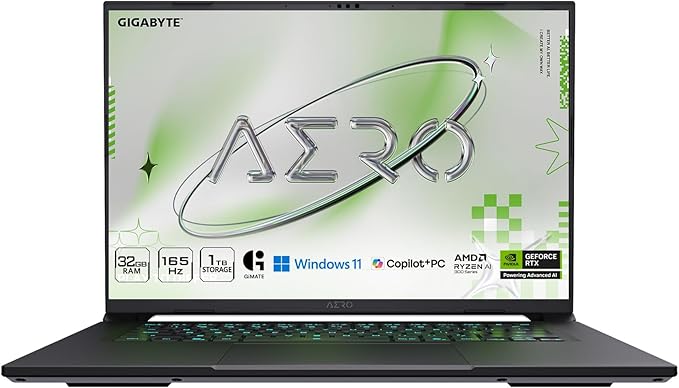
The GIGABYTE AERO X16 is designed specifically for content creators. The RTX 5070 with Ryzen AI 9 HX 370 delivers strong GPU rendering for Premiere Pro and DaVinci Resolve, while the 16-inch 2560×1600 165Hz display balances resolution with refresh rate for smooth timeline work. 32GB DDR5 RAM handles multi-stream 4K editing without complaint. The Copilot+ PC designation means AI-accelerated features work natively. At its price point, it occupies interesting middle ground — more rendering power than the MacBook Air, better value than the MacBook Pro, but without the OLED display quality of the ProArt P16 or the ecosystem advantages of macOS. For Windows editors who want strong RTX performance in a clean, creator-oriented chassis without gaming aesthetics, the AERO X16 is a solid professional choice.
✅ PROS
- RTX 5070 — fast GPU rendering in Premiere and Resolve
- Creator-focused design without gaming aesthetics
- 32GB DDR5 handles multi-stream 4K editing
- 165Hz display for smooth timeline scrubbing
- Copilot+ PC with AI acceleration
- Clean, professional chassis design
✖ CONS
- IPS display — not OLED, lower contrast than ProArt
- 7-9 hr battery — needs power for editing sessions
- No touchscreen or stylus support
- No SD card reader built-in
- Less ecosystem integration than Mac
- Fan noise under sustained GPU workloads
MacBook Pro 14″ (M5 Max)
Compact Rendering PowerhouseThe MacBook Pro 14-inch M5 Max squeezes desktop-class rendering power into a 3.4 lb chassis. The 18-core CPU and 32-core GPU handle 8K ProRes footage and heavy multicam editing without breaking a sweat. 36GB unified memory provides the bandwidth for complex timelines. For editors who need maximum rendering power but travel constantly, this is the only laptop that delivers M5 Max performance in a genuinely portable form factor. The catch is the same as always with Max chips: the price. At $3,499+, most editors would get more value from the 14-inch M5 Pro at $1,999 — which handles 4K editing beautifully. The Max only justifies its price for editors regularly working with 6K+ footage, heavy VFX compositing, or workflows that genuinely max out the Pro’s GPU. And the 14-inch screen, while gorgeous, feels cramped for long editing sessions.
✅ PROS
- Desktop-class GPU in a 3.4 lb laptop
- 32-core GPU handles 8K ProRes and VFX compositing
- 36GB unified memory for complex timelines
- Same XDR ProMotion display as 16-inch model
- 15+ hour battery despite the power
- Thunderbolt 5 for fast external storage
✖ CONS
- $3,499+ — extreme price for a 14″ laptop
- 14″ screen feels cramped for long editing sessions
- Diminishing returns vs M5 Pro for 4K workflows
- Heavy thermal load spins fans aggressively
- Most editors better served by 14″ M5 Pro at $1,999
- Storage upgrades add $200-$600
Lenovo ThinkPad P16 Gen 3
Best ISV-Certified Workstation
The ThinkPad P16 Gen 3 is the tank of this list. ISV-certified for Premiere Pro and DaVinci Resolve, it’s built for editors who need guaranteed software compatibility and enterprise-grade reliability. The RTX PRO 3000 Blackwell GPU with 12GB VRAM handles professional GPU-accelerated workflows. The 16-inch 4K+ UHD+ display provides sharp, accurate colors for grading. 64GB DDR5 RAM means you won’t run out of headroom even with complex multicam timelines. Two Thunderbolt 5 ports enable high-speed external storage arrays. The build quality is legendary — MIL-STD-810H tested for drops, vibration, and extreme temperatures. The trade-offs: it’s heavy at 5.8 lbs, the design is pure function over form, and battery life is shorter than consumer laptops. But for studios and production houses that need a certified, reliable editing workhorse, the P16 delivers.
✅ PROS
- ISV-certified for Premiere Pro and DaVinci Resolve
- 64GB DDR5 — most RAM on this list
- RTX PRO 3000 with 12GB VRAM for pro workflows
- MIL-STD-810H tested — tank-grade durability
- Two Thunderbolt 5 ports
- 16″ 4K+ display with accurate colors
✖ CONS
- 5.8 lbs — heaviest laptop on this list
- 6-8 hr battery — desk-bound for editing
- Design is purely functional — no style points
- Fan noise under sustained workloads
- RTX PRO drivers lag behind GeForce Studio drivers
- Expensive to upgrade beyond base config
How We Ranked the Best Video Editing Laptops of 2026
Every ranking on TheShoposaurus starts with extensive research: we evaluate dozens of expert reviews and lab tests, verify manufacturer specifications against official sources, and weigh thousands of verified owner experiences to find the best video editing laptops for real-world use. Products are scored on CPU and GPU power, RAM, color-accurate display, storage speed, and thermals for sustained rendering.
- Best video editing laptops — Best Video Editing Laptop Overall: MacBook Pro 16″ (M5 Pro)
- Best video editing laptops — Best Windows Video Editing Laptop: ASUS ProArt P16 (RTX 5070)
- Best video editing laptops — Best Portable Video Editing Laptop: MacBook Pro 14″ (M5 Pro)
- Best video editing laptops — Best Value Windows Editing Laptop: HP OMEN Ultra Slim 16
- Best video editing laptops — Maximum Rendering Power: MacBook Pro 16″ (M5 Max)
What is the best laptop for video editing in 2026?
The best laptops for video editing pair a powerful multi-core CPU, a capable dedicated GPU (or an Apple M-series Pro/Max chip), 32GB or more of RAM, fast NVMe storage, and a color-accurate display. Both high-end Windows laptops with RTX graphics and Apple MacBook Pros excel — the right choice depends on your software and whether you need CUDA acceleration or Apple’s efficiency.
What specs do you need for 4K video editing?
For smooth 4K editing, target a recent 8-core-plus CPU, a dedicated GPU with at least 8GB of VRAM (RTX 4070/5070 class) or an Apple M-series Pro/Max chip, 32GB of RAM, and a 1TB-plus NVMe SSD. A color-accurate display covering 100% of sRGB and most of DCI-P3 matters just as much, since you cannot grade footage you cannot see accurately.
How much RAM do you need for video editing?
16GB is the bare minimum for 1080p editing, 32GB is the recommended sweet spot for smooth 4K work, and 64GB is worth it for 6K/8K footage, heavy effects, and running multiple apps at once. Timeline scrubbing, background rendering, and large caches all consume memory, so more RAM directly reduces stutter and export times.
Are gaming laptops good for video editing?
Yes — a gaming laptop is one of the best values for video editing. Its powerful CPU, dedicated RTX GPU, and strong cooling are exactly what accelerate rendering and playback, often at a lower price than a ‘creator’ laptop with the same specs. The downsides are flashier styling and shorter battery life, but for pure editing performance-per-dollar, gaming laptops are hard to beat.
Do you need a dedicated GPU for video editing?
For anything beyond basic 1080p cuts, yes. A dedicated GPU (or Apple’s Pro/Max graphics) accelerates playback, effects, and exports dramatically, turning multi-hour renders into minutes. Laptops with only basic integrated graphics struggle with 4K timelines, color grading, and modern codecs, so a capable GPU is the single most important upgrade for editors.