Best Budget Laptops
March 2026
Every laptop under $1,000 tested for what actually matters — real-world performance, battery life, build quality, and the features you shouldn’t have to sacrifice just because you’re on a budget.
⚔️ Head to Head Battle
Apple MacBook Neo
Best Value Laptop of 2026
The MacBook Neo is the most disruptive laptop launch of 2026. At $599, Apple delivers a full macOS experience in a gorgeous aluminum chassis with 14 hours of real-world battery life — clocked it at nearly 14 hours on their 4K battery test, only 2.5 hours behind the $1,099 MacBook Air M5. The A18 Pro chip handles web browsing, Office, email, video calls, and even photo editing without complaint. The 13-inch Liquid Retina display hits 500 nits. The trackpad is excellent. At 2.7 lbs, it’s identical in weight to the MacBook Air. The trade-offs are honest: 8GB non-upgradeable RAM, no keyboard backlight, only two USB-C ports (no Thunderbolt), and no Touch ID on the base model. But for students, first-time Mac buyers, and anyone who wants Apple quality at a budget price, nothing else comes close.
✅ PROS
- $599 — cheapest Mac laptop ever made
- Full macOS experience — not a compromised Mac
- 14-hour battery life — nearly matches the Air
- Aluminum build quality at a budget price point
- 2.7 lbs — same weight as MacBook Air
- Apple’s most repairable laptop in 14 years per iFixit
✖ CONS
- Only 8GB RAM — non-upgradeable
- No keyboard backlight — white keys help but not enough
- No Thunderbolt — just two USB-C ports
- No Touch ID on $599 base model ($699 adds it)
- A18 Pro is phone-derived — can’t match M-series chips
- 256GB base storage fills up fast
Lenovo IdeaPad Slim 3x
Best Value Windows Laptop
This is a top budget laptop pick for 2026, and for good reason. The IdeaPad Slim 3x delivers over 16 hours of battery life from a Snapdragon X Plus processor, a 15-inch touchscreen display that’s sharp and bright, and a keyboard that’s surprisingly comfortable for the price. At around $649, you get 16GB RAM and a 512GB SSD — a spec sheet that cost $1,000+ just two years ago. The ARM-based Snapdragon chip handles browsers, Office, Teams, and streaming flawlessly. Like all ARM Windows laptops, some legacy x86 apps may run with reduced performance, but for the standard productivity workflow, this is unbeatable value.
✅ PROS
- 16+ hour battery life — all-day guaranteed
- $649 for 16GB/512GB is exceptional value
- Top budget laptop pick for 2026
- Comfortable keyboard for extended typing
- Snapdragon X handles all productivity apps
- Touchscreen adds versatility
✖ CONS
- ARM chip — some x86 apps run in emulation
- 15.3″ screen at 1080p could be sharper
- No Thunderbolt — USB-C only
- Speakers are mediocre
- No OLED display option
- Heavier than ultraportable alternatives at 3.59 lbs
Acer Nitro V 16 AI (2025)
Best Budget Gaming Laptop
The Acer Nitro V 16 is the cheapest way to get an RTX 50-series GPU. Regularly available at $629 on sale, the RTX 5050 delivers 72 FPS average in Cyberpunk 2077 at 1080p — impressive for a budget gaming laptop. DLSS 4 Multi Frame Generation support means playable frame rates in demanding AAA titles. The 16-inch 180Hz display gives extra vertical space over standard 1080p, and battery life of 8-12 hours for light use is exceptional for a gaming laptop. The Ryzen 5 240 CPU is entry-level and will bottleneck in CPU-heavy games, but for the money, nothing else offers this combination of gaming capability and all-day battery life.
✅ PROS
- Cheapest RTX 50-series gaming laptop available
- 8-12 hr battery — best gaming laptop battery life
- 72 FPS Cyberpunk 2077 at 1080p
- DLSS 4 Multi Frame Generation support
- 16″ 180Hz display is smooth and spacious
- Expandable: extra M.2 + SO-DIMM slots
✖ CONS
- Ryzen 5 240 bottlenecks CPU-heavy games
- 512GB storage fills up fast with modern games
- Budget build quality — chassis flex
- 5.38 lbs — not portable
- No OLED option
- Fan noise noticeable under gaming load
HP OmniBook 5 14″
Best OLED + Battery Under $700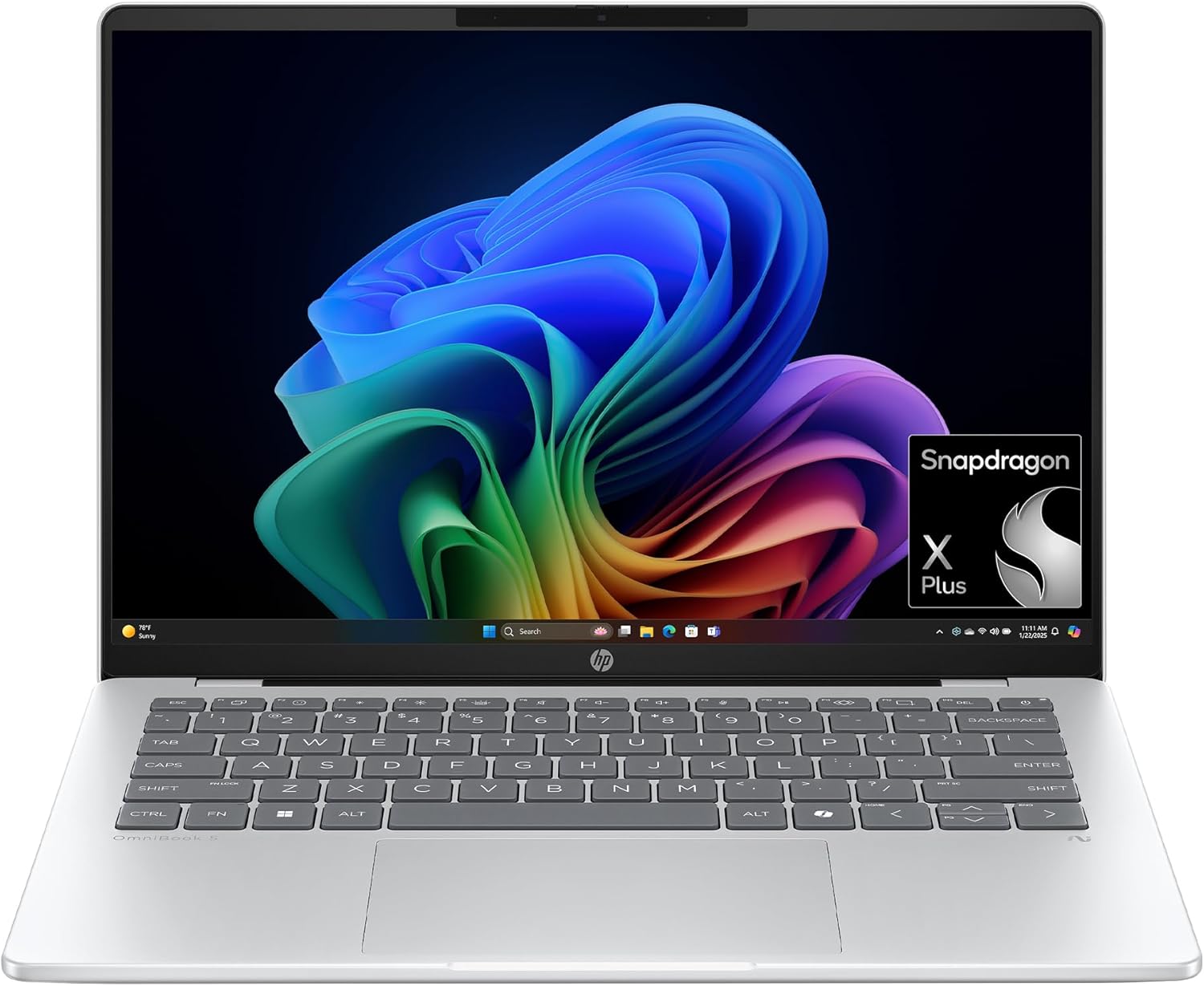
The HP OmniBook 5 rewrites what’s possible at the budget price point. For $679, you get an OLED display, Snapdragon X Plus, 16GB RAM, and battery life measured in days — over 25 hours in video playback testing. It’s a standout pick in its class. The aluminum lid feels premium, the 2.9 lb weight makes it genuinely portable, and HP Fast Charge hits 50% in 30 minutes. The OLED panel delivers perfect blacks and vibrant colors you typically only see on laptops twice this price. The catch is the ARM-based Snapdragon chip — some legacy Windows apps have compatibility issues. But for web browsing, Office, streaming, and cloud-based workflows, the OmniBook 5 delivers a premium experience at a budget price.
✅ PROS
- OLED display at $679 — unmatched at this price
- 25+ hour battery life
- Class-leading performance and value
- Aluminum lid with premium build quality
- 2.9 lbs — genuinely ultraportable
- HP Fast Charge: 50% in 30 minutes
✖ CONS
- ARM Snapdragon — some x86 apps incompatible
- OLED brightness only 300 nits — struggles outdoors
- 60Hz refresh rate — no high-refresh option
- USB-C ports limited to 10Gbps, no Thunderbolt
- Wi-Fi 6E only, not Wi-Fi 7
- GPU too weak for gaming beyond casual titles
ASUS Zenbook A14
Best Ultralight Under $800
The ASUS Zenbook A14 is one of the lightest laptops you can buy at any price — just 2.2 lbs with a 14-inch OLED display. Powered by Snapdragon X Plus with 45 TOPS of NPU performance, it’s a Copilot+ PC that handles productivity workloads while sipping battery. The OLED panel delivers 100% DCI-P3 color coverage and 600 nits HDR brightness, making it one of the best displays on any budget laptop. At around $699, you get 16GB DDR5 and 512GB SSD in a chassis that genuinely disappears in a bag. The trade-off is the same ARM compatibility caveat as other Snapdragon laptops, and the ultralight chassis means limited ports and no discrete GPU. For travelers, students, and anyone who counts every ounce, the Zenbook A14 is the best weight-to-quality ratio on this list.
✅ PROS
- 2.2 lbs — one of the lightest laptops at any price
- 14″ OLED with 100% DCI-P3 and 600 nits HDR
- Copilot+ PC with 45 TOPS NPU
- $699 for OLED + 16GB/512GB is excellent value
- Fanless design — completely silent operation
- Premium build quality belies the price
✖ CONS
- ARM Snapdragon — some x86 apps incompatible
- Limited port selection on ultralight chassis
- No discrete GPU for creative workloads
- Keyboard travel is shallow due to thin design
- No Thunderbolt support
- Small 14″ screen may feel cramped for some
Acer Swift Go 14
Best All-Rounder Under $800
The Acer Swift Go 14 punches absurdly above its price. For around $799 you get Intel Core Ultra with Thunderbolt 4, 16GB RAM, a fast 1TB SSD, and a gorgeous touchscreen display. The aluminum chassis feels sturdy, battery life hits 10-12 hours in real use, and the port selection includes USB-A and HDMI alongside USB-C. Intel Arc Graphics provide enough grunt for light photo editing and casual gaming. The keyboard has a bit of flex under heavy typing and the speakers are just okay, but at this price with this spec sheet and Thunderbolt 4 connectivity, the Swift Go 14 is the best-value Windows all-rounder you can buy right now.
✅ PROS
- Thunderbolt 4 + USB-A + HDMI port selection
- Aluminum chassis feels genuinely premium
- 2.87 lbs — easy to carry all day
- 1TB SSD included at this price point
- Intel Core Ultra 7 155H is a strong performer
- 10-12 hour battery life
✖ CONS
- Keyboard has slight flex under pressure
- Speakers are mediocre at best
- No OLED on this configuration
- Webcam is 1080p — adequate
- Fan can be audible under sustained load
- No SD card reader
Apple MacBook Air 13″ (M4)
Best Laptop Under $1,000
names the MacBook Air M4 the best laptop under $1,000, and every other major outlet agrees. The M4 chip delivers performance that embarrasses Windows laptops costing twice as much — sustained multi-core output without the fan ever spinning up, because there is no fan. The 13.6-inch Liquid Retina display hits 500 nits with P3 wide color, making it genuinely usable outdoors. Battery life exceeds 18 hours in real-world use. At $899 (frequently on sale for $799), the only real compromises are the 256GB base storage (too small) and the 16GB RAM ceiling. It ranks #7 here only because of its higher price relative to the budget competition above it — make no mistake, this is the most capable laptop under $1,000.
✅ PROS
- 18+ hour battery life — best under $1,000
- M4 chip outperforms most $1,500 Windows laptops
- Completely silent — fanless design
- Build quality and trackpad are class-leading
- MagSafe charging + Thunderbolt 4 ports
- macOS security and ecosystem integration
✖ CONS
- 256GB base storage is too small — upgrade to 512GB
- No USB-A or HDMI — dongle life begins
- 16GB RAM cap limits heavy multitasking
- macOS won’t run all Windows enterprise software
- Webcam is only 1080p — adequate but not great
- $899 is at the ceiling of “budget”
Lenovo Yoga 7i 2-in-1
Best 2-in-1 Under $1,000
The Yoga 7i is the best convertible laptop you can buy without spending four figures. The 16-inch 2K touchscreen supports an active pen (sold separately) for note-taking and sketching, and the 360-degree hinge moves smoothly between laptop, tent, and tablet modes. Intel Core Ultra 7 256V provides solid performance for everyday tasks, and battery life pushes past 12 hours. The build quality is impressive for the price — aluminum lid, solid keyboard with good travel, and a responsive touchpad. Wi-Fi 7 is included standard. For students who want a tablet and laptop in one device, or professionals who annotate documents and take handwritten notes, the Yoga 7i delivers genuine versatility.
✅ PROS
- 360° hinge for laptop, tent, and tablet modes
- 16″ 2K touchscreen is sharp and spacious
- Active pen support for notes and sketching
- 12+ hour battery life
- Wi-Fi 7 included standard
- Aluminum lid with solid build quality
✖ CONS
- Pen sold separately — adds $50-80
- 4.19 lbs — heavier than clamshell alternatives
- No OLED display option at this price
- Intel Iris Xe limits creative workloads
- Gets warm in tablet mode under load
- 16″ size is bulky for tablet use
ASUS Zenbook 14 OLED
Best Display Under $900
If display quality is your top priority and you have under $900, the Zenbook 14 OLED is the answer. The 14-inch FHD+ OLED touchscreen panel delivers stunning color accuracy with true blacks and vibrant contrast. Intel Core Ultra 9 285H provides powerhouse performance, and 32GB DDR5 RAM means you won’t run out of headroom for multitasking. Battery life hits an impressive 18 hours. Two Thunderbolt 4 ports and Wi-Fi 7 round out the connectivity. The keyboard is comfortable for long typing sessions and the 2.87 lb chassis feels premium with its aluminum construction. For content consumers, creative students, and anyone who stares at their screen 8+ hours a day, the OLED upgrade is transformative.
✅ PROS
- OLED touchscreen with stunning color accuracy
- 32GB DDR5 RAM — most on this list
- Intel Core Ultra 9 285H is a powerhouse
- Two Thunderbolt 4 ports + Wi-Fi 7
- 18-hour battery life despite OLED panel
- 2.87 lbs aluminum chassis feels premium
✖ CONS
- FHD+ resolution — not the sharpest OLED available
- ASUS bloatware requires cleanup out of the box
- Fan noise audible under sustained workloads
- No HDMI port — dongle needed for presentations
- Only one USB-A port
- OLED can struggle with outdoor visibility
Acer Aspire Go 15
Best Laptop Under $400
A favorite budget pick, the Aspire Go 15 proves you can get a functional, reliable laptop for well under $400. The 15.6-inch 1080p IPS display is clear enough for streaming and document work, 8GB DDR5 RAM handles basic multitasking, and the 128GB UFS storage provides fast boot times. It won’t win any speed contests — the Intel Core 3 N355 processor is strictly for web browsing, Office, and streaming — but it does those tasks without complaint. Wi-Fi 6 keeps connectivity current, and the port selection covers the basics. For a secondary laptop, a grandparent’s first computer, or a student who genuinely can’t spend more than $400, the Aspire Go 15 is the right call.
✅ PROS
- ~$300 starting price — cheapest on this list
- 15.6″ 1080p IPS display is clear and usable
- DDR5 RAM for snappy basic performance
- Wi-Fi 6 standard
- Lightweight enough for daily carrying
- Windows 11 Home included
✖ CONS
- Intel Core 3 N355 is strictly basic tasks only
- 8GB RAM limits multitasking
- 128GB storage is very tight
- No SSD — UFS storage is slower
- Plastic build feels budget
- Display brightness is low
How We Ranked the Best Budget Laptops of 2026
Every ranking on TheShoposaurus starts with extensive research: we evaluate dozens of expert reviews and lab tests, verify manufacturer specifications against official sources, and weigh thousands of verified owner experiences to find the best budget laptops for real-world use. Products are scored on performance-per-dollar, RAM and storage, build quality, display, and battery life within a budget.
- Best budget laptops — Best Value Laptop of 2026: Apple MacBook Neo
- Best budget laptops — Best Value Windows Laptop: Lenovo IdeaPad Slim 3x
- Best budget laptops — Best Budget Gaming Laptop: Acer Nitro V 16 AI (2025)
- Best budget laptops — Best OLED + Battery Under $700: HP OmniBook 5 14"
- Best budget laptops — Best Ultralight Under $800: ASUS Zenbook A14
What is the best budget laptop in 2026?
The best budget laptops deliver a Core i5 or Ryzen 5 processor, 16GB of RAM, a 512GB SSD, and a crisp IPS display for around $500–$700. At that price you get a machine that handles browsing, office work, streaming, and video calls smoothly for years — the key is not overpaying for features you will not use.
What is a good cheap laptop?
A good cheap laptop pairs an Intel Core i5 or AMD Ryzen 5 CPU, 16GB of RAM, a 512GB SSD, and a 1080p IPS screen for roughly $400–$700. Avoid the cheapest models with 8GB of RAM, slow eMMC storage, or low-resolution panels — those corners are exactly what make a bargain laptop feel slow within a year.
How much should you spend on a laptop?
For everyday use, $500–$700 buys a genuinely good laptop that will last years. Below about $400 you start sacrificing RAM, storage speed, and screen quality; above $1,000 you are paying for premium builds, better displays, or performance most people do not need. Match the budget to your actual workload rather than overspending on specs you will not use.
How much RAM do you need in a budget laptop?
16GB is the new sweet spot, even on a budget. 8GB can technically run Windows 11, but modern browsers and background apps fill it quickly and cause slowdowns. If you can only find 8GB in your price range, prioritize a model with an accessible RAM slot so you can upgrade later.
Is a Chromebook better than a laptop on a budget?
It depends on how you work. Choose a Chromebook if you mostly live in a browser and want the simplest, most secure experience with long battery life and instant updates. Choose a budget Windows laptop if you need specific desktop programs or offline software. For students and casual users a Chromebook often does more for less, while Windows is safer for wider software support.