💻 BUSINESS LAPTOP FACE-OFF
ThinkPad E14 vs Latitude 3540 — Which Business Laptop Wins?
Lenovo’s entry-level ThinkPad takes on Dell’s budget Latitude in a battle of enterprise workhorses. We compare keyboards, displays, security, docking, and total cost of ownership.
⚡ Quick Verdict
Choose the ThinkPad E14 if you value the best keyboard in business, a brighter 16:10 display, and longer battery life. Choose the Latitude 3540 if your priority is Thunderbolt 4 docking, maximum RAM upgradeability (64GB), and Wi-Fi 6E for enterprise fleet deployment.
🏆 Our Pick
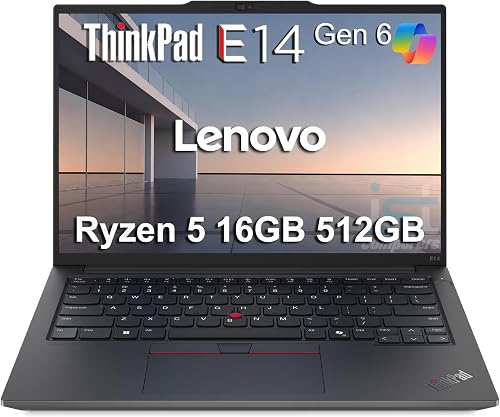
Lenovo ThinkPad E14 Gen 6
The keyboard king of entry-level business
87
VS

| Specification | ThinkPad E14 | Latitude 3540 |
|---|---|---|
| Processor | AMD Ryzen 5 7535U (6C/12T) | Intel Core i5-1335U (10C/12T) |
| RAM | 16GB DDR5 (up to ~40GB) | 16–64GB DDR4 (dual SODIMM) |
| Storage | 512GB–1TB PCIe Gen4 | 256GB–2TB PCIe NVMe |
| Display | 14″ 1920×1200 IPS, 300 nits | 15.6″ 1920×1080 IPS, 250 nits |
| Aspect Ratio | 16:10 | 16:9 |
| Battery | ~57Wh, 10+ hours | ~54Wh, 8–9 hours |
| Thunderbolt | No (AMD) / Optional (Intel) | Thunderbolt 4 standard |
| USB-A Ports | 2 (one USB 2.0) | 3 (all USB 3.2 Gen 1) |
| WiFi | Wi-Fi 6 | Wi-Fi 6E |
| Ethernet | Yes (RJ-45) | Yes (RJ-45) |
| Security | dTPM 2.0, fingerprint | dTPM 2.0, fingerprint, smart card opt |
| MIL-STD 810H | Yes | Yes |
| Price | ~$650–$800 | ~$600–$750 |
| Our Score | 87/100 | 84/100 |
Keyboard & TypingWinner: ThinkPad E14
This is Lenovo’s signature advantage. The ThinkPad E14 inherits the legendary ThinkPad keyboard DNA—well-spaced keys with satisfying travel, a firm actuation point, and the iconic TrackPoint nub. Every major reviewer praises ThinkPad keyboards, and the E14 Gen 6 continues that tradition. The Latitude’s keyboard is functional and backlit, but lacks the same tactile precision.
ThinkPad E14: ThinkPad keyboards are consistently rated best-in-class for business laptops.
Latitude 3540: Dell’s keyboard is decent with good key travel, but lacks the ThinkPad’s signature feel and TrackPoint.
DisplayWinner: ThinkPad E14
The ThinkPad E14’s 14-inch WUXGA (1920×1200) panel uses a 16:10 aspect ratio, giving roughly 11% more vertical screen real estate. It’s also brighter at 300 nits vs. the Latitude’s 250 nits. Neither has great color accuracy, but the ThinkPad’s brighter, taller panel is clearly better for productivity.
ThinkPad E14: 16:10 aspect ratio with 300 nits—better for documents and spreadsheets.
Latitude 3540: Larger 15.6-inch panel gives more total screen area, but only 250 nits and 16:9 wastes vertical space.
Docking & ConnectivityWinner: Latitude 3540
The Latitude 3540’s Thunderbolt 4 port is its trump card—single-cable docking with enterprise docks for power, dual monitors, keyboard, mouse, and Ethernet. The AMD ThinkPad E14 lacks Thunderbolt entirely. The Latitude also has three USB-A ports and Wi-Fi 6E.
ThinkPad E14: USB-C 3.2 Gen 2 with DP alt mode works with many docks, but lacks Thunderbolt bandwidth for dual 4K.
Latitude 3540: Thunderbolt 4 enables true single-cable enterprise docking—the gold standard for IT fleet deployments.
Battery LifeWinner: ThinkPad E14
The ThinkPad E14’s 57Wh battery and efficient Ryzen 5 7535U consistently deliver 10+ hours in real-world use. The Latitude 3540’s slightly smaller 54Wh battery typically manages 8–9 hours. For mobile professionals, that extra 1–2 hours matters.
ThinkPad E14: The AMD Ryzen variant is particularly efficient, with several reviewers noting all-day battery life.
Latitude 3540: Adequate for desk-based work with charger nearby, but won’t comfortably last a full travel day.
Enterprise SecurityWinner: Latitude 3540
Both ship with Windows 11 Pro, dTPM 2.0, and fingerprint readers. The Latitude edges ahead with optional smart card reader support and Dell’s broader vPro management ecosystem. For IT departments standardized on Dell, the Latitude integrates more seamlessly.
ThinkPad E14: Lenovo Vantage and ThinkShield provide solid fleet management and security tools.
Latitude 3540: Dell’s vPro configurations and smart card reader give IT departments more deployment flexibility.
ThinkPad E14 — Pros & Cons
- ✓ Best-in-class ThinkPad keyboard with TrackPoint
- ✓ 16:10 display with 300 nits brightness
- ✓ Longer battery life (10+ hours)
- ✓ Built-in RJ-45 Ethernet
- ✓ MIL-STD 810H tested
- ✓ dTPM 2.0 and fingerprint reader
- ✓ Lighter 14″ chassis
- ✖ No Thunderbolt on AMD variant
- ✖ One USB-A port is USB 2.0
- ✖ Display color accuracy is mediocre
- ✖ RAM limited to ~40GB
- ✖ Wi-Fi 6 (not 6E)
Latitude 3540 — Pros & Cons
- ✓ Thunderbolt 4 for single-cable docking
- ✓ 3× USB-A 3.2 Gen 1 ports
- ✓ Wi-Fi 6E
- ✓ Up to 64GB RAM (dual SODIMM)
- ✓ Optional smart card reader
- ✓ Larger 15.6″ display
- ✓ Lower starting price
- ✖ Dimmer display (250 nits)
- ✖ 16:9 aspect ratio
- ✖ Shorter battery (8–9 hours)
- ✖ Keyboard not ThinkPad-grade
- ✖ Fan noise reported
Buy the ThinkPad E14 if you…
- Type extensively and demand the best keyboard
- Work on the go and need 10+ hours of battery
- Prefer a 16:10 display for documents
- Want a compact 14″ form factor
- Don’t need Thunderbolt 4
Buy the Latitude 3540 if you…
- Need Thunderbolt 4 for enterprise docking
- Want maximum RAM (up to 64GB)
- Prefer a larger 15.6″ screen
- Require smart card reader
- Are standardized on Dell infrastructure
Final Verdict
The ThinkPad E14 Gen 6 earns our pick for mobile business professionals who value the best typing experience, a brighter 16:10 display, and all-day battery life. The Latitude 3540 is smarter for IT departments deploying desk-bound fleets that need Thunderbolt 4 docking and Dell’s enterprise management tools. Both are excellent—your winner depends on whether work lives on the road or at a desk.
Frequently Asked Questions
Which has a better keyboard?
The ThinkPad E14, without question. Lenovo’s ThinkPad keyboards are widely regarded as the best in business laptops, with satisfying key travel and the iconic TrackPoint.
Can I dock the ThinkPad E14 with one cable?
The Intel version with optional Thunderbolt can. The AMD version uses USB-C with DP alt mode, which works with many docks but may not support dual 4K monitors.
How much RAM can each support?
ThinkPad E14: up to ~40GB (8GB soldered + 32GB SODIMM). Latitude 3540: up to 64GB via two SODIMM slots.
Do both have Ethernet ports?
Yes. Both include built-in RJ-45 Ethernet—crucial for enterprise environments where wired connections are more reliable and secure.
Which is better for IT fleet deployment?
The Latitude 3540, thanks to Thunderbolt 4 docking, Dell vPro support, and smart card reader options. The ThinkPad E14 is better for individual mobile workers.
Affiliate Disclosure: This comparison contains affiliate links. The Shoposaurus may earn a commission at no additional cost to you. See our full disclosure and editorial standards.